How Do I Stop My Law Firm’s Invoices from Getting Rejected?
Invoice rejections can delay payments and create extra work for law firm billing teams. A client may reject a bill because it contains incorrect details, uses the wrong matter number, includes charges that do not follow billing rules, or lacks required information. Fortunately, many of these problems can be prevented with a few simple checks.
A smooth billing process starts with accurate records and a clear understanding of each client’s requirements. The following steps can help your billing team identify common mistakes, prepare accurate invoices, and reduce unnecessary delays.
1. Follow Each Client’s Billing Guidelines
Every client may have different rules for legal billing. One client may require detailed time entries, while another may limit certain expenses or set specific hourly rates. Therefore, your billing team should understand these requirements before preparing an invoice.
Read the client’s billing guidelines when you start working on a matter. Keep a copy that staff can easily access whenever they prepare a bill. Also, review any updates the client sends and make sure everyone follows the latest instructions. A clear understanding of these rules gives your team a reliable starting point and helps prevent billing problems later.
2. Check Time Entries Before Preparing Invoices
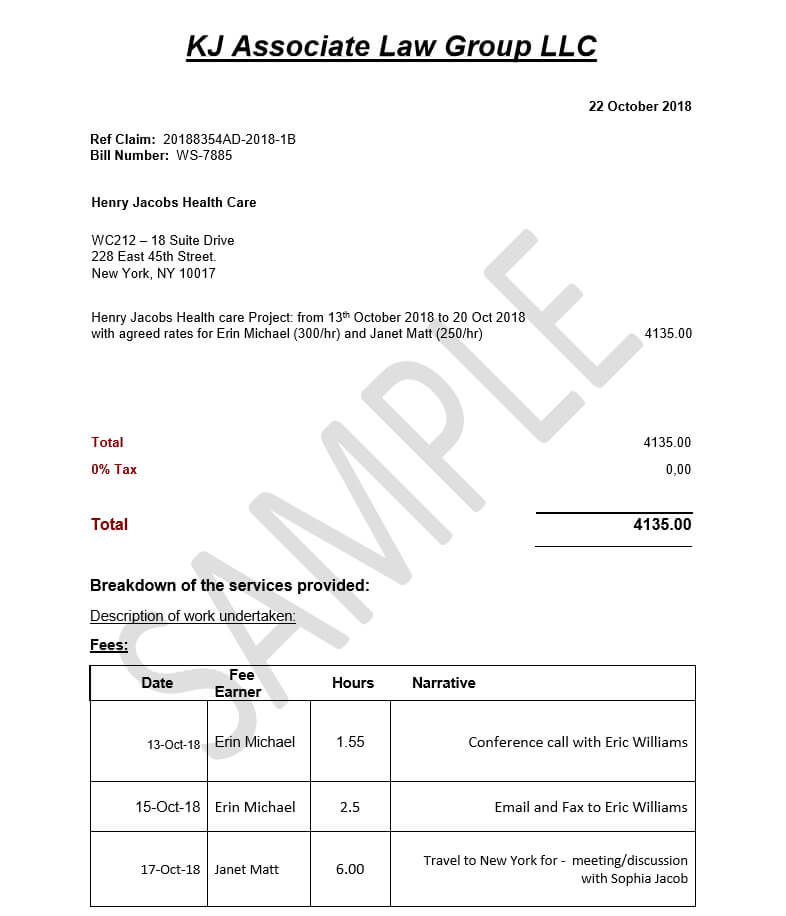
Once the billing requirements are clear, the next step is to check how the legal work has been recorded. Incorrect or incomplete time entries can lead to billing questions and rejections. Lawyers should describe their work clearly and include enough information for clients to understand each charge.
For example, an entry such as "Reviewed documents" may not explain what the lawyer reviewed or why the work was necessary. A clearer entry could state "Reviewed contract documents to identify issues for the client’s upcoming negotiation," provided that this accurately describes the work performed.
Before submitting a bill, check that each entry includes the correct date, timekeeper, hours, billing rate, and description.
Clear and detailed time entries make charges easier to understand and give clients a better picture of the legal services provided.
3. Use the Correct UTBMS Task and Activity Codes
Accurate time entries are important, but some clients also require specific codes to classify legal work. These UTBMS task and activity codes help clients understand the types of tasks and activities listed on an invoice.
Your billing team should check that each required code matches the work performed and meets the client’s requirements. A missing code, an unsupported entry, or a code that does not match the task may trigger a billing alert.
Rather than selecting a code simply because it appears in the software’s list, check the task description and the client’s instructions before choosing the appropriate option.
Correct coding helps clients classify charges consistently and reduces the risk of avoidable billing questions.
4. Verify Timekeeper Rates and Expenses
Even when time entries and task codes are correct, an invoice may still be rejected if the rates or expenses do not follow the client’s rules. Clients may approve specific hourly rates for partners, associates, paralegals, and other professionals. If an invoice uses a rate that differs from the approved amount, the client may question or reject the charge.
Check each timekeeper’s approved rate before submitting the bill. Similarly, review expenses such as travel, filing fees, and outside services. Make sure the client permits each expense, the amount matches the supporting record, and the invoice includes any required receipts.
If the client needs to approve a rate change or expense in advance, obtain that approval before including the charge. A careful review of rates and expenses helps prevent incorrect charges from delaying the entire invoice.
5. Enter the Correct Client and Matter Details
After checking the charges, make sure the invoice contains the correct client and matter information. Even when the charges are accurate, incorrect reference numbers or account details can cause rejection. Before submission, verify the following details:
• Client name and matter number
• Invoice number and billing period
• Invoice date and payment details
• Timekeeper names and billing rates
• Required purchase order or reference number
• Supporting documents and expense receipts
Check these details against the client’s records instead of relying on information from an older invoice. Also, confirm that the same invoice has not already been submitted. Accurate invoice details help ensure that the bill reaches the correct place and can be reviewed without unnecessary confusion.
6. Review the Invoice for Billing Rule Violations
Once the invoice details are complete, the next step is to check whether the entire bill follows the client’s billing rules.
Many e-billing systems compare invoices against client requirements before sending them for approval. Depending on the software and its settings, these checks may flag incorrect rates, duplicate charges, missing codes, unsupported expenses, or other problems.
Review every alert before submitting the invoice. Correct genuine errors and discuss unclear warnings with the responsible lawyer or billing manager. An alert should not be ignored simply because the software allows you to continue.
However, passing an automated check does not guarantee approval. A client may still question a charge that does not match the work performed or the agreed billing terms.
A final review of these alerts helps catch problems that earlier checks may have missed.
7. Submit Invoices Through the Required System
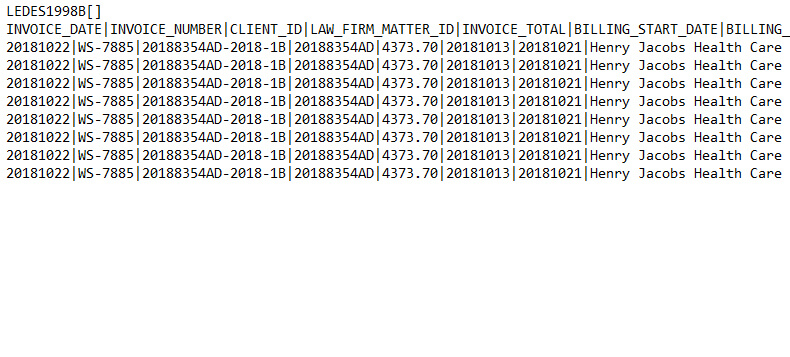
After checking the invoice for errors, make sure it is submitted according to the client’s instructions. Some clients accept invoices only through a specific e-billing platform. Others may require a particular electronic format, such as LEDES, along with supporting documents.
Follow the submission instructions carefully. Check that the file meets the required format, contains the necessary information, and uploads without errors. If the client requires invoices to go through a particular platform, sending a PDF directly through email may not meet its requirements.
Once the invoice has been submitted, save the confirmation or reference number so your team can track its progress. Following the correct submission process helps prevent technical or administrative problems from holding up an otherwise accurate bill.
8. Check Matter Requirements Before Submission
In addition to invoice details, some clients require law firms to complete other tasks related to a legal matter before they accept a bill. These may include updating budgets, submitting status reports, or completing other required matter details. Check the matter’s current status before submitting the bill. If the client’s system holds invoices until required tasks are complete, resolve those items promptly.
For instance, some e-billing platforms can place an invoice on hold when required matter tasks remain incomplete. Depending on the system’s rules, the invoice may also be returned if the outstanding requirements are not completed within the specified period. Checking these requirements in advance helps prevent delays that are unrelated to the invoice’s charges.
9. Track Submitted Invoices and Respond to Questions
Submitting an invoice is not the end of the billing process. Your team should continue monitoring its status and respond promptly when clients request corrections or further details. Check whether each bill remains pending, has received approval, needs clarification, or has been rejected. If the client raises a question, review the comment carefully and provide the requested information as soon as possible.
Some e-billing platforms also allow firms to review rejection comments, submit corrected invoices, and track submission and resubmission history. These records help billing teams understand what happened and identify the next steps. Regular follow-ups help resolve outstanding issues quickly and prevent invoices from remaining pending unnecessarily.
10. Learn from Previous Invoice Rejections
Regular invoice tracking can also help your firm identify repeated problems. If the same errors appear across several bills, correcting each invoice separately may not be enough. Instead, your team should look for the cause and improve the billing process.
For example, if clients repeatedly flag missing task codes, train staff to check those fields before submission. If invoices often contain incorrect rates, maintain an updated list of approved timekeeper rates. Similarly, if supporting receipts are frequently missing, add a document check to the billing process.
Keep a record of rejection reasons, corrections, and recurring issues. Review this information regularly to identify where your team needs clearer instructions, additional training, or better software checks. Learning from past rejections helps turn repeated mistakes into opportunities for improvement.
How Can e-Billing Software Help Prevent Invoice Rejections?
The steps above help billing teams catch mistakes, but checking every detail manually can take time. E-billing software makes this process easier through automated invoice checks. Depending on the system, it can compare charges with client guidelines, flag missing information, identify duplicate invoices, and highlight rate or coding problems.
These checks help staff find common errors earlier in the process. However, the software still needs accurate data and clear billing rules. Your team must review flagged entries, correct mistakes, and confirm that each invoice reflects the work actually performed. When automated checks and careful human review work together, law firms can prepare more reliable invoices and reduce avoidable rejections.
Conclusion
Law firms can reduce invoice rejections when they follow client billing rules, record time accurately, use the correct task codes, and check every charge before submission. They should also verify invoice details, follow the required submission process, track invoice status, and address repeated errors.
The key is to make invoice checking a regular part of the billing process rather than waiting for a client to find a mistake. With clear procedures and consistent reviews, billing teams can reduce errors, limit resubmissions, and keep payments moving without unnecessary delays.

.png)